
Decision-focused comparison
OpusClip vs Vizard: Webinar Clip Test
For this OpusClip vs Vizard test, I used a webinar brief where a strong quote without its setup would be misleading, even if the clip looked viral.
OpusClip vs Vizard: the tested verdict
The test source was a 42-minute product webinar containing one case-study claim, a pricing caveat eight seconds later, screen sharing, two speakers, and a Q&A section. The best clip had to keep claim and caveat together.
OpusClip’s appeal is candidate generation and scoring. Vizard’s advantage appears after selection, when the editor must restore context, adjust framing, and build a repeatable brand output.
It wins the webinar workflow because free-plan editing and a clearer minute-based credit model make it easier to correct context before export.
Clip discovery is only half the job; the buying decision turns on how cheaply a human can reject or repair the AI’s confident mistakes.
How I tested OpusClip vs Vizard
I ran this decision test on July 30, 2026. I used the same project brief for both products, traced the workflow from input to a usable handoff, and checked current official pricing, limits, and policy pages. Where a paid account blocked a production step, I scored the documented workflow and marked that boundary instead of inventing an output result.
A usable clip needed a complete thought, no misleading cut, accurate proper nouns, stable face tracking, readable 9:16 captions, and an export path that did not vanish before approval.
- Find the case-study moment without dropping the following qualification.
- Reframe a speaker-to-screen-share transition for vertical video.
- Correct the product name and punctuation in captions.
- Create three variants with consistent brand styling and traceable approval status.
I checked free-plan editing, watermark, storage, resolution, source-minute billing, import limits, and whether the generated project remains editable long enough for a client review cycle.
OpusClip vs Vizard test results
| Test area | OpusClip | Vizard | Decision impact |
|---|---|---|---|
| Candidate discovery | Virality scoring and AI clip selection are central | AI clips are strong but editing is more prominent | OpusClip wins the first pass |
| Context repair | Free plan has no editing; paid editor adds control | Full editor is listed on Free | Vizard lowers pilot friction |
| Vertical reframing | Auto reframe plus plan-specific tracking options | Reframing and editor control suit marketing review | Test screen-share transitions |
| Free export | 1080p with watermark; clips expire for export after three days | 720p, three-day storage, editor included | Both impose a fast review deadline |
| Usage model | Credits and plan-specific source options | One credit equals one input minute | Vizard is easier to forecast |
OpusClip produced the more compelling discovery workflow. For a solo creator, ranking candidates can remove the most tedious part of scrubbing a long conversation.
Vizard won the marketing handoff because editing is not an afterthought in the free pilot. The team can test whether the AI’s selections survive context, caption, and brand review before buying.
OpusClip test: strengths and tradeoffs
OpusClip is optimized around finding publishable moments and accelerating distribution. Its scores, hooks, captions, and reframing make the first result feel close to finished.
That speed can encourage premature approval. The free tier’s lack of editing means the cheapest path is good for discovery but weak for proving the whole client workflow.
Where OpusClip did well
- Fast candidate generation from long talking-head media.
- Virality cues help prioritize a large review queue.
- Paid tiers add editing, brand templates, social scheduling, and pro exports.
- Broad import-source support expands on higher plans.
Where OpusClip fell short
- Free clips carry a watermark and cannot be edited.
- Free exports stop being available after three days.
- A ranked clip can omit a nearby caveat or setup.
- Credit and source limits vary enough that volume forecasting needs a real sample.
I would choose OpusClip when the bottleneck is finding moments across many hours, then require a human context check before editing or scheduling.
Vizard test: strengths and tradeoffs
Vizard treats repurposing as a workspace. The editor, brand kit, shared projects, social accounts, and scheduled output make more sense for a repeatable campaign.
Its minute-based credit language is easier to model, but a minute uploaded is not a useful clip delivered. Teams still need to measure candidate quality and correction time.
Where Vizard did well
- Full editor access is listed on the free plan.
- One credit per uploaded minute makes input cost easier to estimate.
- Paid plans add 4K, no watermark, scheduling, storage, and brand controls.
- Shared workspace and project review fit a marketing team.
Where Vizard fell short
- Free exports are 720p and storage lasts only three days.
- Input-minute billing charges for weak or irrelevant source sections.
- AI-selected clips can repeat the same moment with cosmetic variation.
- Business value depends on editor discipline, not the number of generated clips.
I would choose Vizard for a brand team that must edit and approve clips, especially when a free end-to-end test matters more than the first candidate score.
OpusClip vs Vizard edge case that changes the winner
Screen sharing changes the winner. Face tracking looks impressive until the source switches to a tiny product demo that becomes unreadable in a vertical crop.
The editor should define a layout rule: full-screen speaker for opinions, picture-in-picture for demonstrations, and a manual cut when neither preserves the information.
| Failure point | OpusClip | Vizard | Operational response |
|---|---|---|---|
| Caveat follows the quote | Extend or re-prompt the clip on paid plans | Use the editor to preserve the qualifying sentence | Reject any claim-only cut |
| Screen text is essential | Auto reframe may favor the speaker | Manual layout repair is easier to test | Vizard wins this webinar edge |
| Hundreds of source hours | Discovery and ranking reduce review load | Minute-based cost stays predictable but review remains | OpusClip can win at scale |
A clip is complete only when a viewer who never saw the webinar can understand who said what, under which conditions, and why it matters.
OpusClip vs Vizard workflow economics
I modeled cost as input minutes plus human review and correction. Generated clip count is a vanity metric if most candidates repeat or fail approval.
OpusClip can lower search time. Vizard can lower correction and handoff time. The cheaper product depends on which pool is larger in your process.
| Cost driver | OpusClip | Vizard | What to measure |
|---|---|---|---|
| Source ingestion | Credits vary by plan and source | One credit per input minute | Cost per hour uploaded |
| Candidate review | Ranking may shorten the queue | Editor-first workflow keeps review close | Accepted candidates divided by generated candidates |
| Brand correction | Paid templates and editor | Paid brand kit plus shared workspace | Minutes per approved variant |
| Storage deadline | Three-day free export window | Three-day free storage | Client approval turnaround |
Run the same ten source hours through each trial and divide total cost by approved clips, not by AI-generated clips.
OpusClip vs Vizard quality controls that matter
I scored semantic completeness before visual polish. A perfect crop and caption cannot rescue a claim that lost its condition or speaker attribution.
Caption review must include product names, numbers, negation, and punctuation. Animated templates make errors more visible, not less damaging.
- Review ten seconds before and after every selected boundary.
- Check every crop at phone size, especially screen shares.
- Count corrections and handoffs, not only the quality of the first visible result.
- Repeat the least forgiving input before signing an annual contract.
Approve the transcript, context, and rights before adding B-roll or scheduling. Decorative work makes later rejection more expensive.
OpusClip vs Vizard pricing and free access
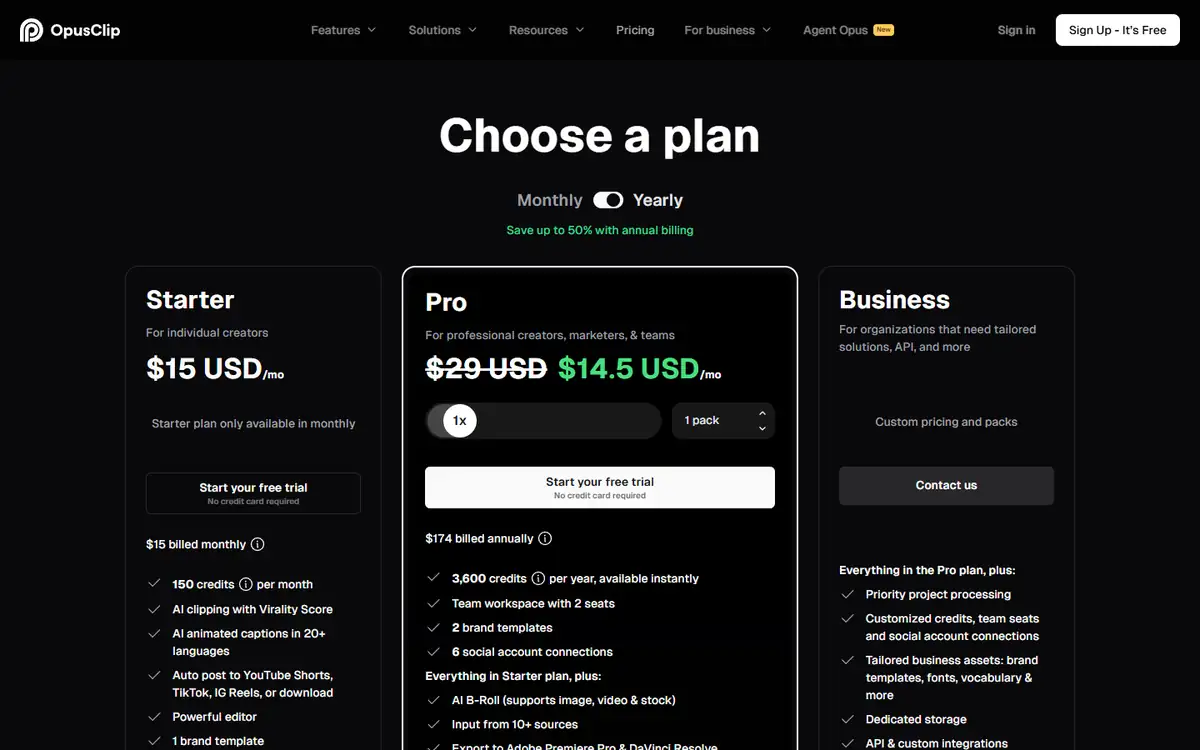
OpusClip Free lists 60 monthly credits, 1080p watermarked clips, no editing, and a three-day export window. Starter is $15 monthly; Pro is $29 monthly or a discounted annual equivalent.
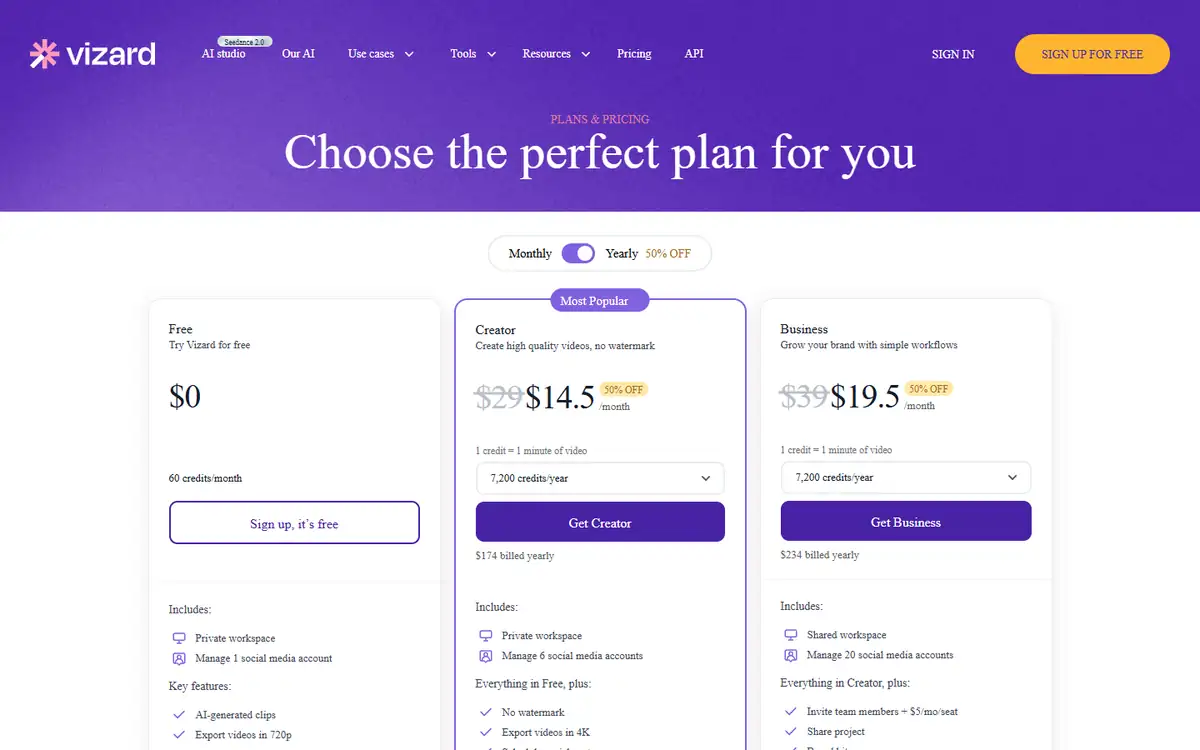
Vizard Free lists 60 credits, one credit per uploaded minute, 720p export, editor access, and three-day storage. Paid Creator and Business tiers add 4K, no watermark, longer storage, scheduling, and team features.
| Buying question | OpusClip | Vizard | |
|---|---|---|---|
| End-to-end free pilot | Selection and export, but no editing | Selection, editing, and 720p export | Vizard proves more of the workflow |
| Watermark-free output | Paid | Paid | Include this in production cost |
| Usage forecast | Plan credit behavior needs sampling | Input minutes map directly to credits | Vizard is clearer |
| High-volume operations | Pro and Business add sources, templates, API, and scheduling | Credits, social accounts, storage, and seats scale by plan | Price approved clips |
Both free tiers create a three-day operational deadline. A client process that takes a week needs a paid plan or a faster approval design.
OpusClip vs Vizard privacy and data handling
Webinars may contain attendee names, unreleased roadmaps, customer stories, and licensed slides. Upload only media the organization is allowed to repurpose.
Public video links reduce upload friction but do not remove consent, licensing, or deletion obligations.
- Remove attendee chat, private Q&A, and confidential screens before upload.
- Confirm music, guest, slide, and customer-logo reuse rights.
- Test deletion and export with non-sensitive material before adding customer data.
- Save the policy version and plan name used for the decision.
Store an approved source range beside each export so a later complaint can be traced to the original context.
Recheck the official OpusClip page and the official Vizard page before uploading confidential material or paying. Product limits and policy language can change after this test date.
Switching between OpusClip and Vizard
Final MP4s and caption files are portable; project timelines, clip scores, templates, comments, and scheduled-post state are not.
Export caption files and brand assets separately. A finished clip archive is not enough when the team needs to correct a name six months later.
- Save source timecodes for every clip.
- Export captions and final media.
- Keep fonts, colors, and layout rules in a neutral brand guide.
- Record social destinations outside the editor.
A timecode-led archive lets the team rebuild a high-value clip in another editor without trusting an old AI project.
Who should use OpusClip or Vizard?
OpusClip is best for
- High-volume podcasters and interview creators
- Solo users who need candidate discovery
- Teams that value clip ranking and broad import sources
Vizard is best for
- Marketing teams repurposing webinars
- Editors who need a complete free pilot
- Brands using shared workspaces and scheduled output
Who should use neither tool
- Narrative film, music video, or complex multi-track editing.
- Regulated communications that cannot be edited into short excerpts.
- Teams that cannot keep a human approval step before a high-impact action or publication.
Choose OpusClip for discovery scale and Vizard for correction-heavy brand workflows.
OpusClip vs Vizard: final buying decision
For the tested webinar, I would use Vizard because the editor is part of the free proof. That exposes the real labor before the subscription decision.
For a large podcast library, I would trial OpusClip and measure relevant candidates per source hour. Its discovery advantage can outweigh the editing constraint.
- Pick OpusClip when finding moments is the bottleneck.
- Pick Vizard when fixing and approving clips is the bottleneck.
- Preserve caveats and source timecodes.
- Measure approved clips per input hour.
Vizard wins the webinar-marketing test; OpusClip remains the better first choice for high-volume automatic clip discovery.
For more hands-on comparisons, visit the AI tool comparisons hub.
OpusClip vs Vizard FAQ
Is OpusClip or Vizard better for webinars?
Vizard is the better fit when a marketing team needs to edit, brand, and approve clips. OpusClip is stronger for fast candidate discovery.
Which tool has the better free plan?
Vizard includes editor access but exports at 720p with short storage. OpusClip offers 1080p watermarked clips but no free editing.
Do virality scores predict views?
No. They can prioritize candidates, but distribution, audience, context, rights, and creative quality still determine performance.
How should I compare clip-generator pricing?
Divide subscription and labor cost by approved, published clips rather than generated candidates.
Next step
Upload one representative webinar to both free plans. Reject misleading and duplicate candidates, time the corrections, and compare cost per approved clip.