
Decision-focused comparison
Recraft vs Ideogram: Logo Text Test
This Recraft vs Ideogram comparison uses a brand mark that must survive exact spelling, one-color printing, vector editing, and commercial-rights review.
Recraft vs Ideogram: the tested verdict
The brief requested ‘NORTHSTAR LABS’ with no misspelling, a separate geometric mark, one-color legibility at 24 pixels, and an SVG-ready structure. Decorative poster text did not count as a usable logo.
Ideogram’s text strength helps it produce more plausible wordmarks early. Recraft’s design and vector orientation becomes more valuable once the mark must be separated, recolored, resized, and handed to another designer.
It wins the production-design task because editable vector-oriented output and style control matter more than the most impressive first raster concept.
Neither AI image is a finished logo; Recraft offers the better production bridge, while Ideogram offers the faster concept board.
How I tested Recraft vs Ideogram
I ran this decision test on July 30, 2026. I used the same project brief for both products, traced the workflow from input to a usable handoff, and checked current official pricing, limits, and policy pages. Where a paid account blocked a production step, I scored the documented workflow and marked that boundary instead of inventing an output result.
I scored exact text, kerning repair effort, symbol independence, one-color survival, small-size recognition, export format, privacy, and commercial-use terms.
- Generate eight directions with the exact two-word brand name.
- Remove texture, mockups, gradients, and background scenery.
- Separate wordmark and symbol for horizontal and square lockups.
- Prepare a one-color master that a designer can edit and a trademark attorney can inspect.
I treated any misspelled image as a failed logo even if it looked good. I also separated platform output rights from trademark clearance, which no generator provides.
Recraft vs Ideogram test results
| Test area | Recraft | Ideogram | Decision impact |
|---|---|---|---|
| Exact wordmark concepts | Good within a design workflow | Text rendering is a defining strength | Ideogram wins ideation |
| Editable production asset | Vector generation and editing are central | Raster-first concepts usually need rebuilding | Recraft wins handoff |
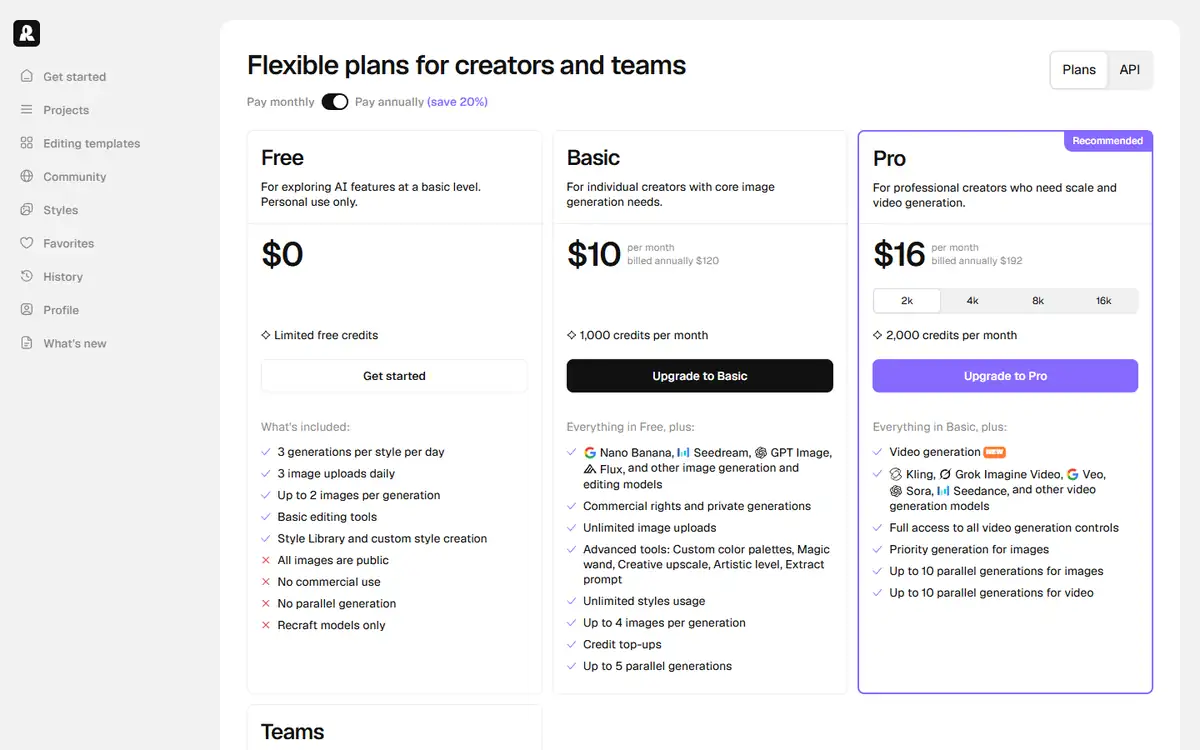
| Free commercial rights | Free outputs are owned by Recraft and not licensed for commercial use | Ideogram states it does not restrict output rights | Ideogram has the safer free-rights posture |
| Privacy | Paid work remains private; free output is public | Private generation depends on plan | Do not use free public generation for unreleased names |
| Consistency across a set | Styles and design controls support a system | Strong concepts but more manual normalization | Recraft wins the brand-system task |
Recraft won when the deliverable became a master asset rather than a mood board. Editing structure and keeping a visual system coherent reduce expensive cleanup downstream.
Ideogram won the early naming workshop. Its text-centered generation can expose unexpected typographic directions quickly, and its free output-rights statement is materially different from Recraft’s.
Recraft test: strengths and tradeoffs
Recraft behaves more like an AI design environment. Vector generation, editing, style systems, background work, and API options make the output easier to continue using.
Its free-plan rights are the critical catch. Recraft states that free images are owned by Recraft, publicly visible, and not licensed for commercial use.
Where Recraft did well
- Vector-oriented generation and editing shorten the path to production.
- Style controls support a family of brand assets.
- Paid outputs are private and grant ownership plus commercial rights.
- API and batch capabilities fit repeatable design pipelines.
Where Recraft fell short
- Free-plan output is not suitable for a commercial logo under the stated rights.
- Credit costs vary by model and action.
- A generated vector can still contain awkward paths and poor geometry.
- Style consistency can lock a team into platform-specific settings.
I would use Recraft on a paid plan for a designer-led brand exploration, then clean the geometry and typography in a standard vector editor.
Ideogram test: strengths and tradeoffs
Ideogram’s advantage is typographic ideation. It can render legible headline-like text and combine wordmark ideas with imagery faster than many general image models.
That does not remove the need to rebuild. Kerning, curves, negative space, and tiny-size behavior require deliberate vector work before the mark becomes a system.
Where Ideogram did well
- Strong text rendering creates more usable wordmark concepts.
- Free plan offers weekly credits for a low-risk pilot.
- Official terms state no restriction on user rights in outputs.
- Large concept batches help compare visual directions.
Where Ideogram fell short
- Private generation and higher throughput require paid plans.
- Raster concepts need manual vector reconstruction.
- Legible text can still have weak kerning or inconsistent letterforms.
- Concept abundance can delay selection and legal review.
I would use Ideogram to generate a concept wall, then move the chosen direction into a human-controlled vector process.
Recraft vs Ideogram edge case that changes the winner
The winner changes for packaging and small physical marks. Fine lines, tiny counters, and gradient detail that look impressive on screen can fail on embossing, stitching, or one-color print.
The AI should be tested against the harshest production method before the team falls in love with a polished mockup.
| Failure point | Recraft | Ideogram | Operational response |
|---|---|---|---|
| One-color stamp | Vector workflow makes simplification easier | Concept likely needs manual rebuild | Recraft wins production repair |
| Unreleased brand name | Use paid private generation | Use a plan with private generation | Avoid free public galleries |
| Fast naming workshop | Good, but design controls invite early refinement | Text concept volume is the advantage | Ideogram wins ideation speed |
Print the candidate at actual size in black and white. That test eliminates weak marks faster than another round of prompting.
Recraft vs Ideogram workflow economics
The major cost is not generation credits; it is designer time spent redrawing and legal time spent rejecting a derivative or conflicting mark.
Recraft can reduce redraw time. Ideogram can reduce concept-search time. Both savings disappear if the team skips early selection criteria.
| Cost driver | Recraft | Ideogram | What to measure |
|---|---|---|---|
| Concept volume | Credits vary by model and operation | Weekly or monthly generation credits | Shortlisted directions per 100 outputs |
| Vector cleanup | Lower starting effort but still needs inspection | Usually requires full reconstruction | Designer hours to master artwork |
| Rights | Paid plan required for ownership and commercial use | Platform states no restriction on output rights | Plan used for the chosen asset |
| Legal review | Not included | Not included | Search and counsel cost by target market |
A smaller batch with explicit criteria is cheaper than hundreds of near-duplicates. Stop prompting once three directions survive spelling, one-color, and small-size tests.
Recraft vs Ideogram quality controls that matter
I inspected spelling at full size, then tested the mark at 24 pixels and in one color. A logo that only works as a large colorful image failed.
I also checked whether symbol and text could be separated without inventing missing geometry. Production flexibility matters more than prompt fidelity.
- Verify every letter, counter, and repeated shape.
- Test black, white, small size, and horizontal and square lockups.
- Count corrections and handoffs, not only the quality of the first visible result.
- Repeat the least forgiving input before signing an annual contract.
Run reverse-image and trademark searches before treating any direction as ownable brand identity.
Recraft vs Ideogram pricing and free access
Recraft uses subscription and top-up credits. Unused subscription credits do not roll over, and free images are public, owned by Recraft, and not licensed for commercial use.
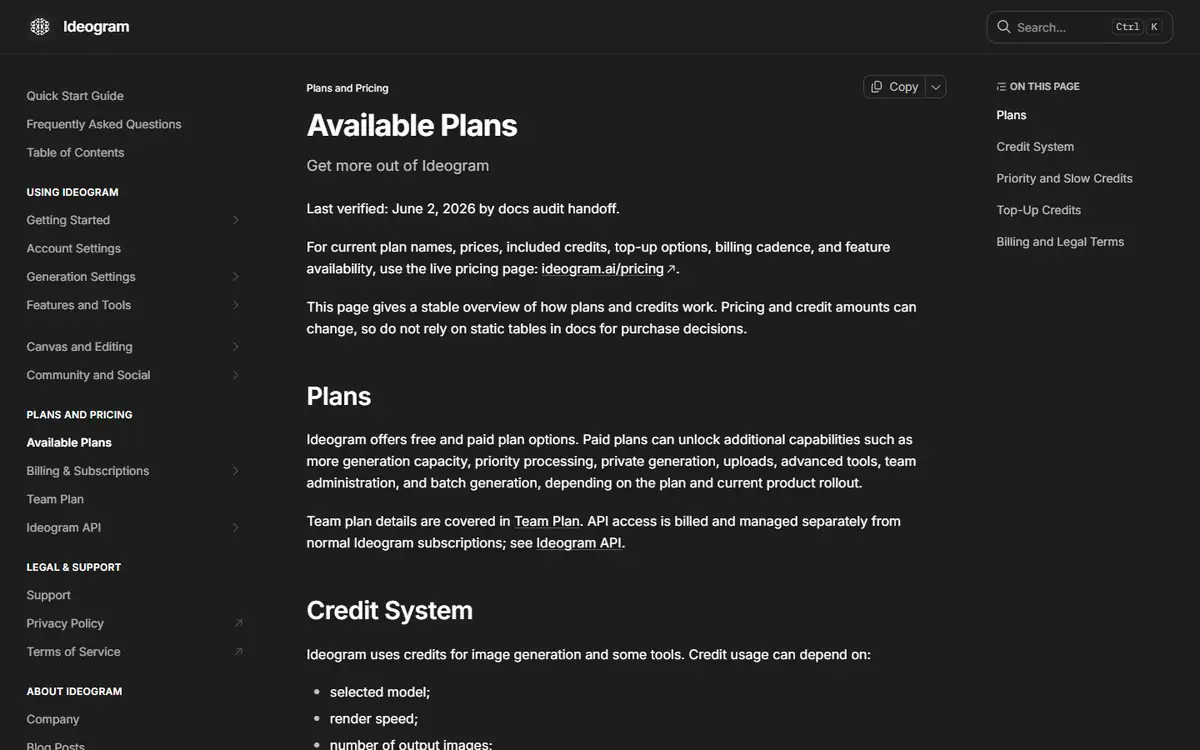
Ideogram lists a free plan with ten slow credits per week, while Plus, Pro, and Team add priority credits, privacy, speed, and capacity. Its documentation says output rights are not restricted.
| Buying question | Recraft | Ideogram | |
|---|---|---|---|
| Commercial free output | No under the stated free-plan terms | No platform restriction stated, subject to law and third-party rights | Rights are not the same as clearance |
| Private generation | Paid | Paid-plan feature | Required for confidential naming work |
| Credit rollover | Subscription credits reset; top-ups do not expire | Monthly priority credits expire; top-ups roll over | Buy near actual use |
| Production formats | Vector and design tools are a core advantage | Concept generation is the primary value | Price cleanup labor |
Use the paid plan before generating the asset you intend to ship. Upgrading after a free generation does not necessarily rewrite the original output’s terms.
Recraft vs Ideogram privacy and data handling
Brand names, packaging, and launch concepts can be market-sensitive. Free public galleries are inappropriate for unreleased work.
Private generation limits exposure but does not replace internal access control or a record of who approved the asset.
- Use fictional names during public testing.
- Move confidential prompts and source images to an approved private plan.
- Test deletion and export with non-sensitive material before adding customer data.
- Save the policy version and plan name used for the decision.
Keep prompts, outputs, edits, plan receipts, and legal-review notes with the final asset.
Recheck the official Recraft page and the official Ideogram page before uploading confidential material or paying. Product limits and policy language can change after this test date.
Switching between Recraft and Ideogram
SVG, PDF, PNG, fonts, and color values are portable. Platform styles, generation history, seeds, and community references may not be.
Rebuild the final mark in a standard vector file with named layers and curves. That breaks dependence on either generator.
- Export vector and high-resolution raster masters.
- Convert platform styles into a written brand guide.
- Record fonts and licenses.
- Archive prompts and selected source output.
The final brand system should outlive the tool that inspired it.
Who should use Recraft or Ideogram?
Recraft is best for
- Designers building brand systems
- Teams needing vector and editing workflows
- Paid commercial projects with private output
Ideogram is best for
- Naming workshops and rapid concept exploration
- Users prioritizing text rendering
- Early-stage teams willing to rebuild the final vector
Who should use neither tool
- Businesses seeking automatic trademark clearance.
- Teams without a designer to rebuild and quality-check the final mark.
- Teams that cannot keep a human approval step before a high-impact action or publication.
Use Ideogram to widen the concept field and Recraft to narrow it toward production.
Recraft vs Ideogram: final buying decision
For a deliverable logo, I would choose paid Recraft and keep a designer in control of the final vector.
For a low-cost concept workshop, I would use Ideogram, then discard weak directions before any legal or production investment.
- Pick Recraft for editable production work.
- Pick Ideogram for typographic concept breadth.
- Check rights before generation.
- Rebuild and clear the final mark manually.
Recraft wins the production logo test; Ideogram wins text-heavy concept exploration and has the friendlier stated free-output rights.
For more hands-on comparisons, visit the AI tool comparisons hub.
Recraft vs Ideogram FAQ
Is Recraft or Ideogram better for logos?
Recraft is better for vector-oriented production work. Ideogram is better for fast text-heavy concept generation.
Can I use Recraft free images commercially?
Recraft states that free-plan images are owned by Recraft and are not licensed for commercial use.
Can I use Ideogram outputs commercially?
Ideogram states it does not restrict output rights, but users remain responsible for laws, third-party rights, and trademark clearance.
Do AI logos need a designer?
Yes. A designer should repair typography and geometry, create lockups, test production, and prepare master files.
Next step
Generate eight fictional-name concepts in each tool, then test exact spelling, one-color print, 24-pixel size, vector repair time, and plan rights before choosing.