
Hands-on comparison
NoteGPT vs Tactiq: Transcript Test
I pasted the same public TEDx URL into both transcript generators and checked timestamps, visible text, copy access, and the path to a summary.
NoteGPT vs Tactiq: the tested verdict
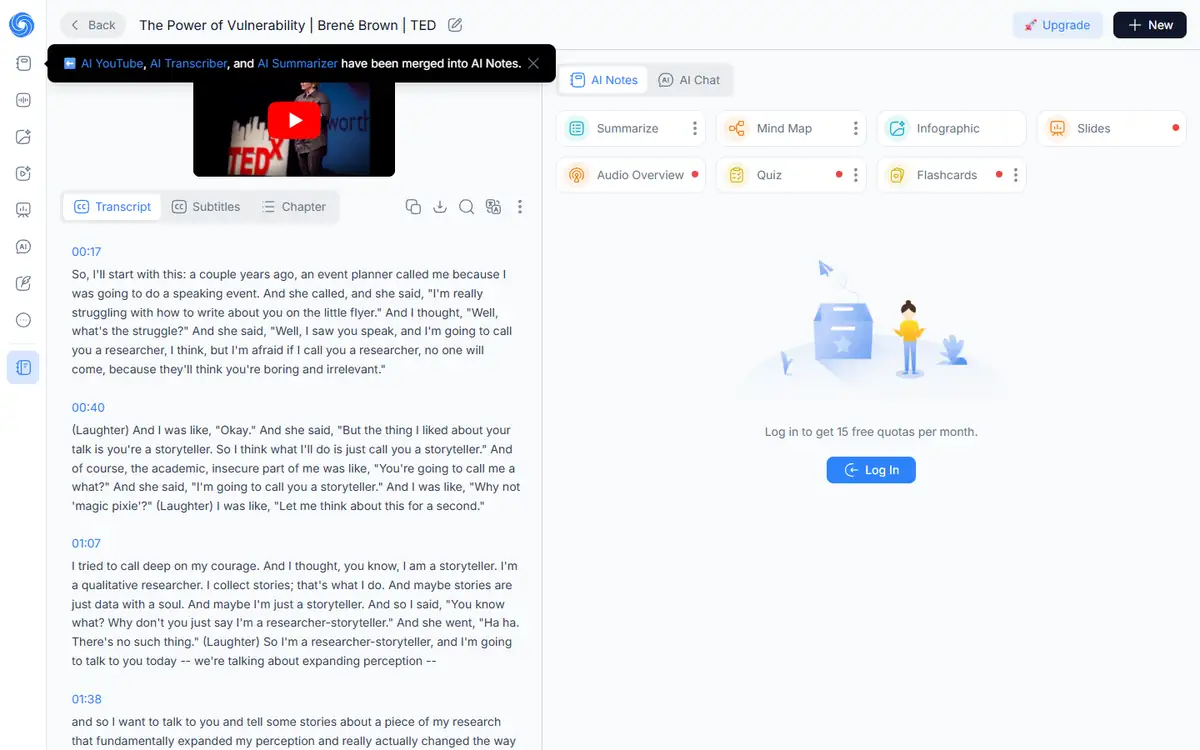
NoteGPT recognized the title and surfaced sequential timestamped paragraphs from 00:17 onward. The first section matched the public talk.
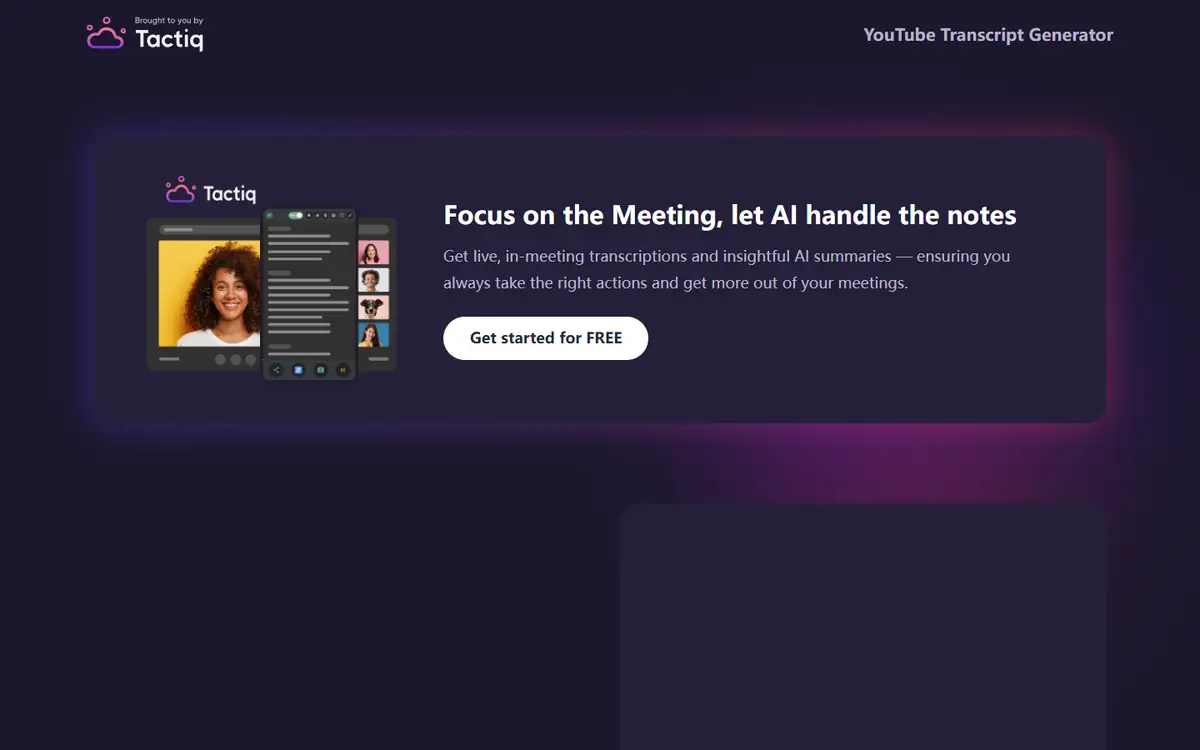
Tactiq reached a result page with Copy and Download buttons, but the central transcript area remained blank. A control without visible content is not a usable result.
It produced visible, timestamped text that could be audited immediately.
Choose NoteGPT for immediate transcript retrieval; test Tactiq in your normal browser before relying on its export controls.
How I tested NoteGPT vs Tactiq
I ran this comparison on July 28, 2026 in a clean, logged-out Chrome session at 1440 by 1050 pixels. Both tools received the same input, and I timed the usable result rather than the first animation or loading state.
The source was a stable public YouTube URL for “The Power of Vulnerability,” long enough to expose loading and timestamp behavior.
- Paste the exact same YouTube URL into each public generator.
- Wait at least 15 seconds for transcript processing.
- Confirm title, timestamps, visible text, and export controls.
- Record whether a summary required another upload or account step.
I did not score transcript accuracy from a handful of words. I first required a visible transcript that could be checked against the video.
NoteGPT vs Tactiq test results
| Test area | NoteGPT | Tactiq | Decision impact |
|---|---|---|---|
| Video recognized | Yes | Result page loaded | Both accepted the URL. |
| Visible transcript | Yes, timestamped | No, blank panel | Only NoteGPT produced auditable text. |
| Copy or export controls | Visible transcript tools | Copy and Download visible | Tactiq controls could not fix missing content. |
| Summary path | Available in product tabs | Prompts another Tactiq upload | NoteGPT kept more work in one page. |
NoteGPT’s result included the talk title and detailed time markers. That made spot checking against the source fast.
Tactiq’s marketing panel dominated the result page while the content area stayed empty. This may be a script or region issue, but it still blocks the task.
NoteGPT test: strengths and tradeoffs
NoteGPT gave me the artifact I asked for rather than an onboarding pitch. The transcript was readable without signing in.
The page also offered subtitle and chapter views, which can help navigation but should not distract from checking completeness.
Where NoteGPT did well
- Visible timestamped transcript
- Correct title recognition
- No account required for this result
Where NoteGPT fell short
- Long pages need careful completeness checks
- Summary quality was not the primary test
- Public limits may vary
NoteGPT is the practical winner for researchers who need the raw text first.
Tactiq test: strengths and tradeoffs
Tactiq accepted the video and rendered a result shell quickly enough.
The blank transcript area meant the workflow could not be audited or exported with confidence.
Where Tactiq did well
- Clear Copy and Download controls
- Familiar meeting-note brand
- Simple URL input
Where Tactiq fell short
- Blank transcript panel in the test
- Heavy promotional content on result page
- Summary required another workflow step
Tactiq may fit existing customers, but anonymous users should verify one full transcript before trusting it.
NoteGPT vs Tactiq quality: what changed the outcome
Transcript quality starts with completeness. A polished summary cannot recover a missing section that never entered the model.
For accuracy, spot-check names, numbers, negation, and the first sentence after several timestamps.
- Use the exact same input and settings for both tools.
- Score task completion before judging polish.
- Count manual fixes, blocked steps, and failed exports.
- Repeat one edge case instead of trusting a single ideal sample.
Speaker labels matter more for interviews than lectures. Match the test video to the future workload.
NoteGPT vs Tactiq pricing and free access
I checked the public entry points and pricing language during the test. I did not treat a prominent free label as proof that the complete workflow was free.
The useful unit is a finished task: an export, an answer set, or a file that can be used outside the editor. A free preview that stops before that point has limited buying value.
| Buying question | NoteGPT | Tactiq |
|---|---|---|
| Can the test start without an account? | See tested result | See tested result |
| Can a usable result be exported? | Verify at the final step | Verify at the final step |
| Are limits based on files, words, or credits? | Check live plan | Check live plan |
| Does the plan renew automatically? | Check checkout | Check checkout |
I would run one representative job before subscribing, then divide the monthly price by the number of outputs that actually pass review. That number is more honest than a per-credit headline.
NoteGPT vs Tactiq privacy and data handling
The test material was synthetic or already public. I did not upload client records, private drafts, identity documents, or unreleased media.
For production use, the practical questions are retention, model-training use, deletion controls, subprocessors, and whether a team plan changes those terms.
- Use a disposable sample before sending confidential material.
- Remove names, account numbers, hidden metadata, and tracked changes.
- Confirm whether deleting a project also deletes source files and generated derivatives.
- Record the policy version used for a regulated workflow.
A polished result does not reduce the sensitivity of the source. If the input would be risky in an ordinary support ticket, it is risky in an AI tool too.
Recheck the official NoteGPT page and the official Tactiq page before uploading confidential material or paying. Product limits and policy language can change after this test date.
Who should use NoteGPT or Tactiq?
NoteGPT is best for
- Students retrieving public lecture transcripts
- Researchers who need timestamps
- Writers who want raw text before summarizing
Tactiq is best for
- Teams already paying for Tactiq
- Meeting-centric users who want one ecosystem
- Users willing to troubleshoot browser scripts
Who should use neither tool
- Teams that need a signed data-processing agreement before any test.
- Users who cannot independently verify the output.
- Workflows where a missed fact, altered edge, or false label creates legal or safety risk.
Neither tool should be used to reproduce copyrighted talks beyond fair quotation and analysis.
NoteGPT vs Tactiq: final buying decision
NoteGPT wins because it completed the requested artifact in the tested session.
Tactiq’s empty result may be temporary, so the fair buying rule is to rerun your own representative video before paying.
- Choose the tool that completes your real task with fewer corrections.
- Treat sign-in walls, CAPTCHAs, and export limits as part of the product.
- Keep a manual verification step for high-impact work.
- Retest after a major model, editor, or pricing update.
Use NoteGPT to get and verify the transcript, then summarize only after checking the beginning, middle, and end against the video.
For more hands-on comparisons, visit the AI tool comparisons hub.
NoteGPT vs Tactiq FAQ
Is NoteGPT better than Tactiq for YouTube transcripts?
In this July 2026 test, yes. NoteGPT showed a complete-looking timestamped transcript while Tactiq’s panel stayed blank.
Does NoteGPT work without sign-up?
The tested public transcript flow returned visible text without an account.
Why can a YouTube transcript tool fail?
Caption availability, rate limits, region, browser scripts, and video settings can all affect retrieval.
Next step
Test both with a video you know well, then search the output for phrases from three different points before saving it.