
Decision-focused comparison
Lovable vs Bolt: Client Portal Test
A portal is ready when two clients can use it without seeing each other’s files. Use the same synthetic brief to compare each builder’s workflow, costs and handoff.
Lovable vs Bolt: practical verdict
The key decision is who will own the portal after its first demo. A guided builder can reduce setup work, while code visibility can help a technical team trace a failure. Those are workflow differences supported by the products’ published features, not a measured winner from a completed head-to-head build.
A same-brief client-portal evaluation
This is a proposed test, not a record of an executed paid build. Give both tools a fictional brief: Client A and Client B each have an owner, staff user, document library and status timeline. Use synthetic PDFs, never customer records.
- Define roles and data. Specify who can invite, upload, download, comment and change status. Put those rights in a matrix before prompting.
- Generate one vertical slice. Ask for sign-in, organization membership, a document list and one upload path. Avoid polishing the whole dashboard first.
- Probe authorization. Sign in as Client A, request Client B’s document and status endpoint directly, then repeat with an expired session. The server must reject both, regardless of hidden buttons.
- Break and recover. Try an oversized file, a duplicate invitation and a failed upload. Check error state, cleanup, audit event and retry behavior.
- Export and rerun. Sync or download the repository, set fresh environment variables, run tests and deploy outside the original workspace if the plan permits.
- Record costs and fixes. Save account plan, credits or tokens consumed, hosting estimates, manual corrections and the unresolved risks before choosing.
What the comparison can establish
| Decision area | Lovable | Bolt | What to verify in your account |
|---|---|---|---|
| Builder workflow | Guided app building and visual edits | Browser development environment and code view | Can the owner diagnose a broken route or policy? |
| Usage unit | Credits across building and running after workspace migration | Tokens; larger project context can raise per-message use | Run the same five-feature slice and read the usage meter. |
| Deployment | Managed hosting; Enterprise cloud-account deployment has preview limits | Hosting included in current plans | Check domain, data location, logs and recovery needs. |
| Handoff | Repository path plus cloud-service dependencies | Repository/export path plus database dependencies | Can a new engineer rebuild outside the editor? |
Do not turn this feature matrix into a speed or security score. A real result needs the same approved brief, comparable plans and saved test artifacts.
Lovable: strengths and limits
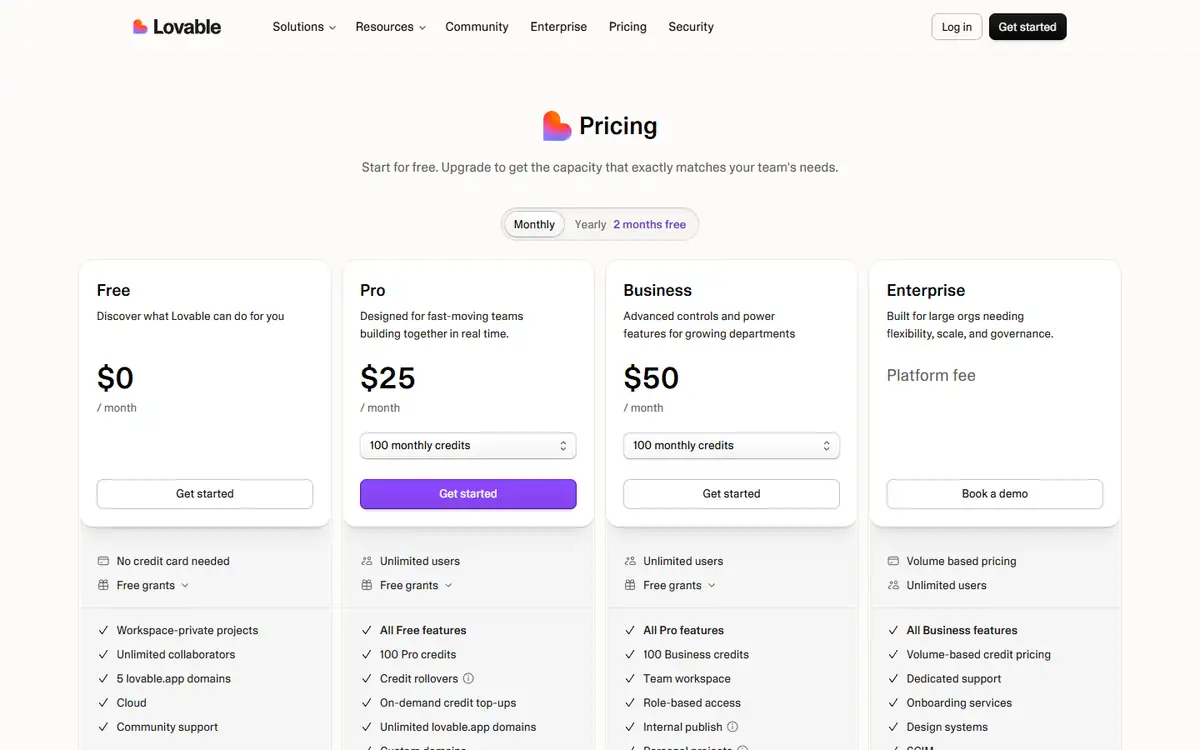
Lovable suits a team that wants to describe the workflow and refine a prototype visually. Its June billing change moves building, Cloud and AI usage toward one credit balance as workspaces migrate; the vendor says plan prices stay the same. Check your own dashboard because migration is gradual. Lovable billing explanation and current plans provide the baseline.
The October Enterprise roundup adds organization controls, approvals and deployment choices, but AWS and Azure deployment are preview routes and the vendor says feature parity is still in progress. These features matter to a governed production rollout; they do not certify a generated portal’s authorization. October Enterprise roundup.
- Useful when a product owner needs quick visual iteration with a guided stack.
- Inspect generated policies, connector scopes and secrets before inviting real clients.
- Budget for credit consumption after the first build, including app traffic and AI features.
Bolt: strengths and limits
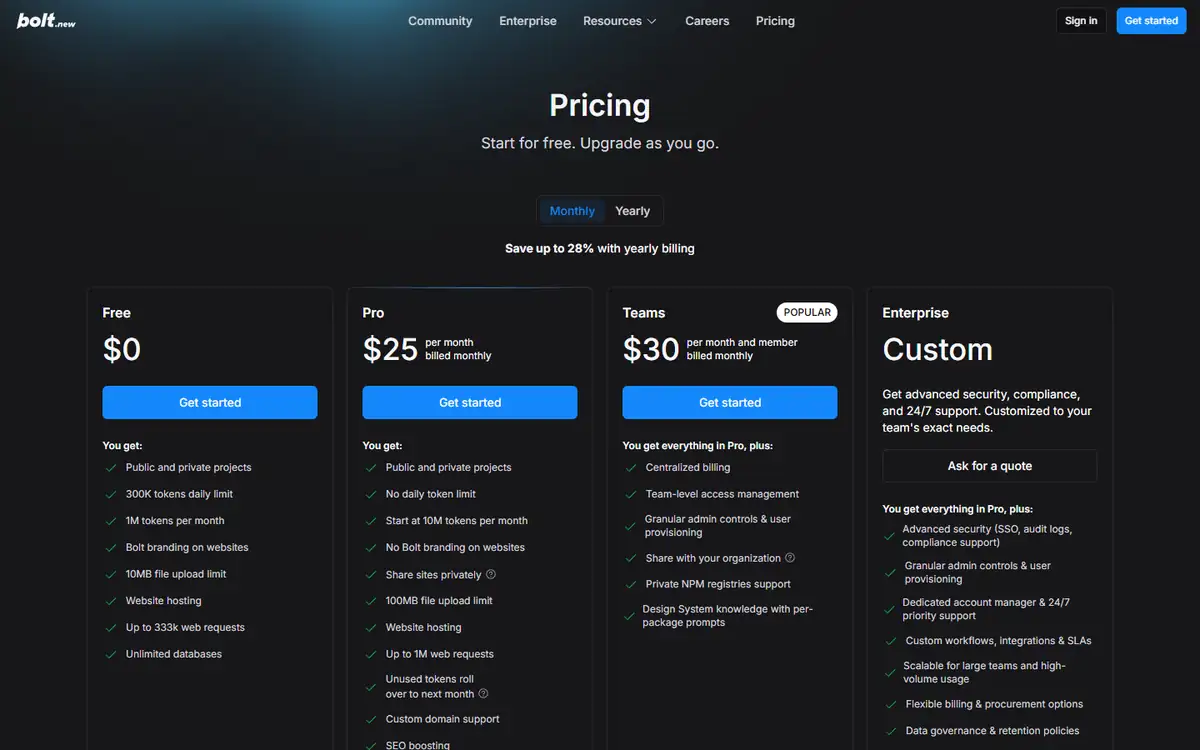
Bolt exposes a browser development environment and code view, which can help a developer trace routes and dependencies. Its current Free plan lists 300,000 tokens daily, one million monthly, 10 MB uploads, hosting and databases. Pro starts at $25 monthly with ten million tokens and a 100 MB upload limit; Teams is per member. The vendor explains that syncing a larger project can increase token use. Bolt plan table.
That code visibility is useful only if someone reviews the code. A generated authorization check in a React component is not a substitute for a database or server rule. Use Bolt’s code/export documentation to test a fresh handoff.
- Useful when a developer owns the repository and can inspect failures.
- Watch context growth and repeated prompts; log tokens after each feature.
- Test the database, uploads and deployment settings separately from the generated UI.
The tenant-isolation edge case
Suppose a synthetic document has ID doc-B-014 and belongs to Client B. A Client A session must receive a denial when it requests the document by direct URL, API call or guessed storage path. Test read, update and delete separately. A hidden row or disabled button is not evidence of access control.
Run the same probe after an invite is revoked and after a user switches organizations. The acceptance record should contain the request, account role, response, server rule and audit event. If neither builder exposes enough information to verify the rule, pause the portal release.
Estimate the full workflow cost
Use one synthetic five-feature slice to compare costs. Record Lovable credits spent on building and live Cloud or AI use, and Bolt tokens spent after the project grows. Add hosting, storage, domain, engineering review and bug-fix time. A subscription price alone does not tell you the cost of a secure client portal.
Illustrative accounting: If each tool takes six human review hours and one needs four more hours to correct tenant rules, that extra review is a cost even if its subscription is cheaper. Those hours are an example, not a measured product result.
Five acceptance checks before inviting clients
- Client A cannot read, modify or delete Client B’s data through direct requests.
- Expired sessions and revoked invitations lose access immediately or within the documented policy.
- Failed uploads leave no orphaned file and produce a useful error and audit event.
- The app is readable at a phone width with keyboard-visible controls and safe empty states.
- A fresh engineer can clone, configure, test and deploy the repository with no private chat history.
Save the test matrix and results. Do not mark a portal “secure” because a builder says it completed the task.
Plans and access as of October 22, 2026
Lovable lists Free, Pro and Business plans; its credit rate depends on plan and action. Its unified credit migration can be at different stages by workspace. Bolt lists a Free token allowance and a Pro subscription beginning at $25 per month. Both can have separate costs for production use. Check Lovable pricing and Bolt pricing in the account and region you will use; neither table predicts your full portal bill.
Customer data and privacy
Use fictional people and documents while testing. Before real uploads, review account access, data region, retention, subprocessors, backup recovery and deletion. Keep production secrets outside prompts and use least-privilege credentials. The October Lovable Enterprise options may help an organization set controls, but preview deployment is not a general promise of data residency for every plan.
For a live portal, ask your security owner to approve the actual architecture and evidence, not a vendor marketing statement.
Switching and code handoff
Code export does not automatically move authentication identities, storage objects, database policies, domains or logs. On day one, connect a repository, document environment variables, export a schema and run the app outside the builder. Repeat after a meaningful change. This is the practical exit test for either product.
Who should use each builder?
Lovable may fit
- Product owners who need to iterate on the client-facing flow.
- Teams accepting a guided stack and explicit engineering review.
- Enterprise teams evaluating governance options with their actual plan.
Bolt may fit
- Developers who will review routes, dependencies and database code.
- Teams with an existing repository and deployment process.
- Projects where code-level debugging is routine.
Neither is a substitute for a competent security review before storing customer documents.
Final decision
Start with the tool your portal owner can use well, then apply the same tenant-isolation and handoff checks. Lovable’s guided workflow and new enterprise controls are relevant if product iteration and governance dominate. Bolt’s code view matters if a developer will own diagnosis. The current public evidence does not justify declaring a tested production winner.
For related comparisons, visit the AI tool comparisons hub.
Lovable vs Bolt FAQ
Can either builder prove a client portal is secure?
No. Test server-side tenant authorization, storage access, session handling and secrets with two synthetic organizations before real customer data.
Which builder suits a nontechnical product owner?
Lovable offers guided building and visual edits. A product owner still needs an engineer to validate authentication, authorization and deployment.
Which gives developers a more direct code workflow?
Bolt exposes its browser development environment and code view. Both products have repository paths, so run an export and dependency check in either case.
Is the cheapest plan enough for a production portal?
Plan credits or tokens are only one cost. Forecast hosting, storage, authentication, review time and recovery work against your actual workload.
Next step
Copy the fictional two-client brief and five acceptance checks into both builders. Save the plan, generated code and failed-request evidence before making a purchase decision.