
Hands-on comparison
DeepL vs Google Translate: Marketing Test
I translated the same product message into Simplified Chinese, compared meaning and sales tone, and recorded the time plus the friction around each result.
DeepL vs Google Translate: the tested verdict
DeepL turned “messy product backlog” into language closer to a disorganized task list and used a smoother launch-style invitation. Google preserved the claims but sounded more literal.
The difference was not large enough to publish either output blindly. The important split was tone versus reliability: DeepL won the wording review, while Google reached a visible result in about one quarter of the time.
Best wording, but the Cloudflare interruption matters for repeated browser work.
Use DeepL for the final marketing draft and Google Translate for fast comprehension, then have a native speaker verify claims and register.
How I tested DeepL vs Google Translate
I ran this comparison on July 28, 2026 in a clean, logged-out Chrome session at 1440 by 1050 pixels. Both tools received the same input, and I timed the usable result rather than the first animation or loading state.
The 212-character source contained a brand name, a product metaphor, a free-trial CTA, a no-credit-card condition, a data-location claim, and an export promise.
- Translate the same English paragraph into Simplified Chinese.
- Preserve the brand name Scout and every factual claim.
- Score naturalness, CTA tone, terminology, speed, and interruption risk.
- Capture the visible result before making any edits.
I read both outputs clause by clause. I gave no credit for extra features because the decision task was one piece of launch copy, not document translation or API volume.
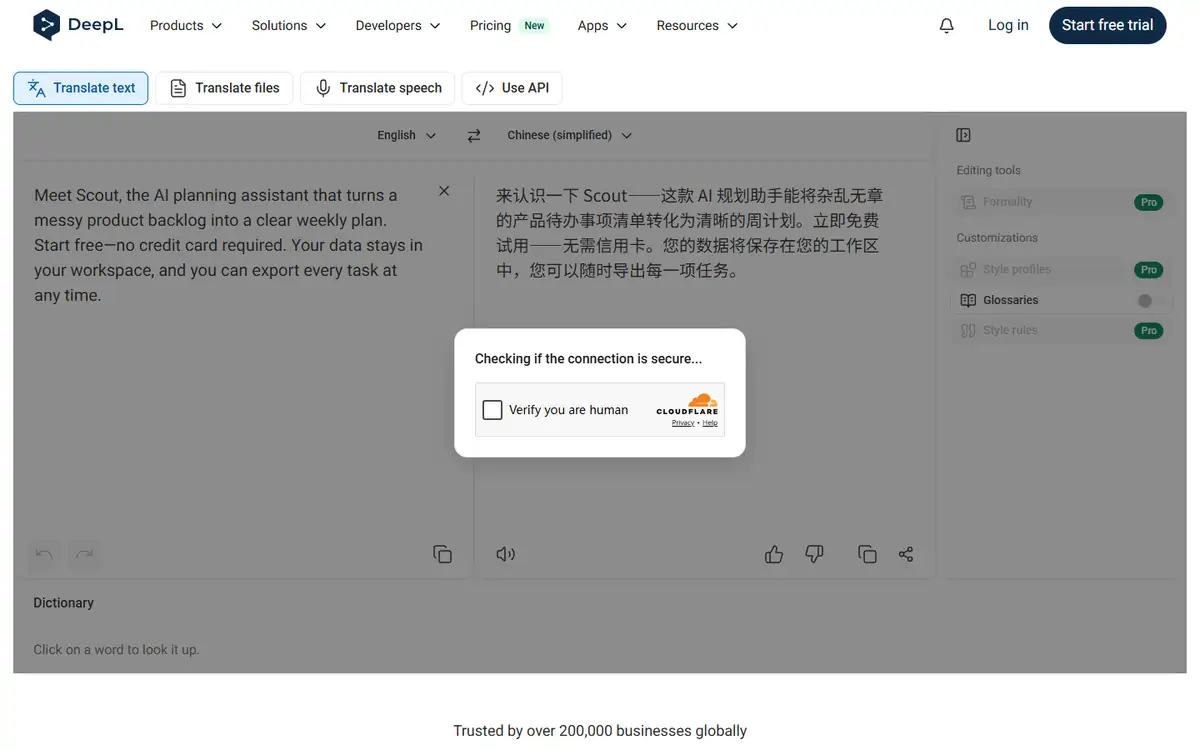
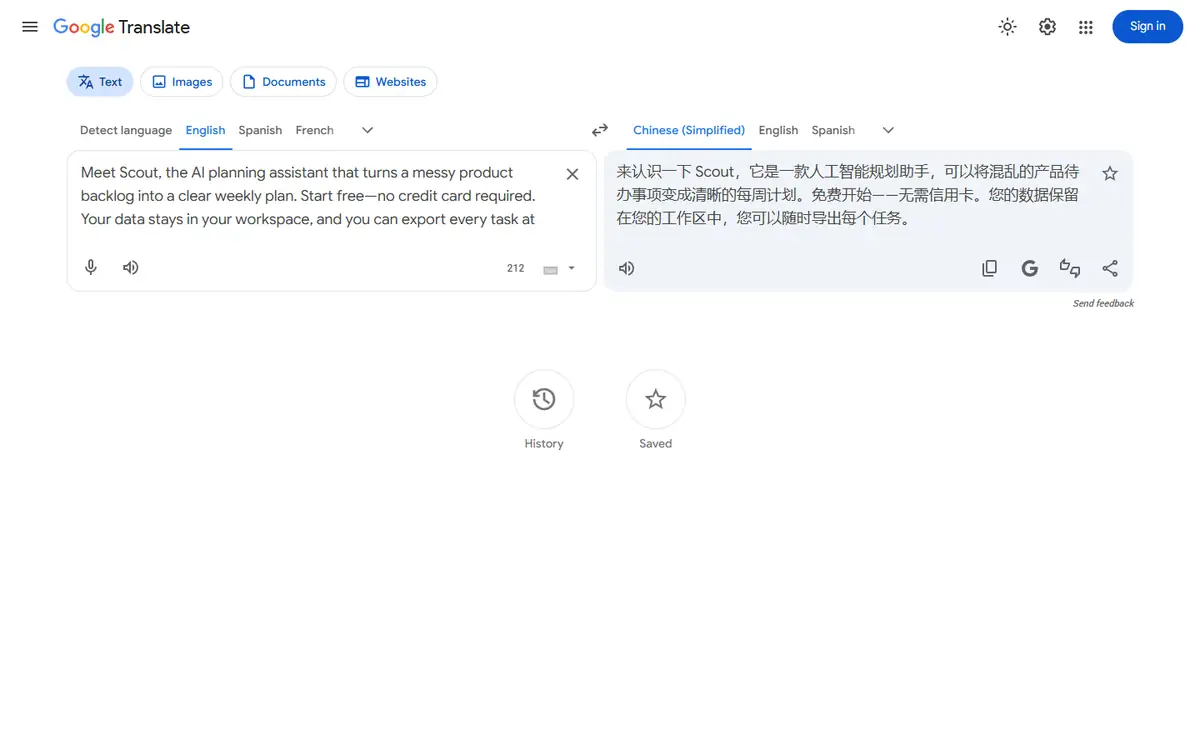
DeepL vs Google Translate test results
| Test area | DeepL | Google Translate | Decision impact |
|---|---|---|---|
| Time to visible result | 33.8 seconds | 8.4 seconds | Google was much faster in this browser run. |
| Brand and claims | Preserved | Preserved | Both kept Scout, no-card, workspace, and export claims. |
| Marketing tone | More launch-ready | More literal | DeepL needed less tonal rewriting. |
| Browser interruption | Cloudflare prompt appeared | None | Google was easier to repeat anonymously. |
DeepL’s “立即免费试用” read like a campaign CTA. Google’s wording was correct but closer to a direct translation of “start free.”
Google’s version also used a literal phrase for the backlog. That is not a factual error, but it would need a copy editor if the page targets Chinese product teams.
DeepL test: strengths and tradeoffs
DeepL won the sentence-level polish test. Its punctuation and clause rhythm looked intentionally written for the target language.
The downside appeared after the output: a human-verification modal covered the interface. For a one-off task this is minor; for a production browser workflow it is real overhead.
Where DeepL did well
- Stronger CTA wording
- Better handling of the backlog metaphor
- Complete output visible before sign-in
Where DeepL fell short
- Slowest result in this run
- Cloudflare interrupted the session
- Professional controls sit behind paid plans
I would pick DeepL when one polished paragraph is worth more than raw throughput.
Google Translate test: strengths and tradeoffs
Google Translate was fast and predictable. The result kept every concrete promise in the source and did not add marketing claims.
Its literal wording is useful for verification because it is easy to map back to the English. The tradeoff is more rewriting before publication.
Where Google Translate did well
- Fast anonymous result
- Clear side-by-side interface
- Good factual preservation in this sample
Where Google Translate fell short
- Less natural product-language rhythm
- Literal terminology
- No automatic guarantee of brand voice
I would use Google as a dependable first pass and comprehension check.
DeepL vs Google Translate quality: what changed the outcome
Translation quality depends on what you call an error. A literal phrase may be semantically correct and still lower conversion because it sounds translated.
I separated hard errors from editorial preference. Neither tool failed a hard claim in this sample; DeepL simply required fewer tonal changes.
- Use the exact same input and settings for both tools.
- Score task completion before judging polish.
- Count manual fixes, blocked steps, and failed exports.
- Repeat one edge case instead of trusting a single ideal sample.
For a larger test, add support copy, UI labels, and one paragraph containing a deliberate ambiguity. Marketing copy alone favors stylistic systems.
DeepL vs Google Translate pricing and free access
I checked the public entry points and pricing language during the test. I did not treat a prominent free label as proof that the complete workflow was free.
The useful unit is a finished task: an export, an answer set, or a file that can be used outside the editor. A free preview that stops before that point has limited buying value.
| Buying question | DeepL | Google Translate |
|---|---|---|
| Can the test start without an account? | See tested result | See tested result |
| Can a usable result be exported? | Verify at the final step | Verify at the final step |
| Are limits based on files, words, or credits? | Check live plan | Check live plan |
| Does the plan renew automatically? | Check checkout | Check checkout |
I would run one representative job before subscribing, then divide the monthly price by the number of outputs that actually pass review. That number is more honest than a per-credit headline.
DeepL vs Google Translate privacy and data handling
The test material was synthetic or already public. I did not upload client records, private drafts, identity documents, or unreleased media.
For production use, the practical questions are retention, model-training use, deletion controls, subprocessors, and whether a team plan changes those terms.
- Use a disposable sample before sending confidential material.
- Remove names, account numbers, hidden metadata, and tracked changes.
- Confirm whether deleting a project also deletes source files and generated derivatives.
- Record the policy version used for a regulated workflow.
A polished result does not reduce the sensitivity of the source. If the input would be risky in an ordinary support ticket, it is risky in an AI tool too.
Recheck the official DeepL page and the official Google Translate page before uploading confidential material or paying. Product limits and policy language can change after this test date.
Who should use DeepL or Google Translate?
DeepL is best for
- Localization teams polishing campaign copy
- SaaS marketers with native-language review
- Writers who value tone over raw speed
Google Translate is best for
- Travel and everyday translation users
- Teams making fast internal drafts
- Editors who want a literal cross-check
Who should use neither tool
- Teams that need a signed data-processing agreement before any test.
- Users who cannot independently verify the output.
- Workflows where a missed fact, altered edge, or false label creates legal or safety risk.
The safest workflow uses both: one for the draft, the other as an independent comparison, and a human for final approval.
DeepL vs Google Translate: final buying decision
DeepL wins this narrow test because the requested output was customer-facing marketing copy.
Google Translate still wins on speed and anonymous reliability. That can outweigh tone for support, research, or time-sensitive comprehension.
- Choose the tool that completes your real task with fewer corrections.
- Treat sign-in walls, CAPTCHAs, and export limits as part of the product.
- Keep a manual verification step for high-impact work.
- Retest after a major model, editor, or pricing update.
Start with Google for meaning, run the approved copy through DeepL, and publish only after a native reviewer checks the locked claims.
For more hands-on comparisons, visit the AI tool comparisons hub.
DeepL vs Google Translate FAQ
Is DeepL better than Google Translate for marketing?
In this July 2026 English-to-Chinese test, DeepL produced more natural campaign wording. Google was faster and more literal.
Did either translator change the product claims?
No. Both preserved the brand, free access, no-card condition, workspace location, and export promise.
Can I publish AI translation without review?
Not for customer-facing claims. A native reviewer should check meaning, terminology, tone, and legal promises.
Next step
Run both tools on one paragraph from your real site, lock the claims, and choose the output that needs fewer native-speaker edits.