
Hands-on comparison
LanguageTool vs Sapling: Grammar Test
An October retest of a flawed client email found four visible flags in each free checker, with different errors missed.
LanguageTool vs Sapling: the retested verdict
For this email, Sapling surfaced two useful corrections absent from LanguageTool. LanguageTool marked the comma splice and “loose,” but also marked “teams,” which needs inspection before accepting a replacement. The observed counters are not accuracy percentages.
More of the planted verb errors appeared in its public editor.
Use either as a first pass. A human must check tone, factual promises, and missed errors before sending client email.
How this grammar comparison was retested
On October 25, 2026, I opened the logged-out public LanguageTool checker and Sapling grammar checker in Chrome at 1440 × 1050. I pasted the same synthetic email, waited eight seconds after each editor accepted it, and recorded the visible flags. This was one browser run, not a benchmark of the paid integrations or extensions.
Hi Maya, I send the proposal yesterday. The meeting calendar are attached and the timeline work for both teams. If you don’t reply by Friday, we might loose the slot, I hope this is okay. Please tell me what you think.
- Check the tense after “yesterday” and agreement after “calendar” and “timeline.”
- Check “loose” versus “lose” and the comma splice after “slot.”
- Read the Friday request for tone. A grammar flag cannot decide whether that pressure fits the relationship.
- Review every proposed edit rather than accepting a counter as a correctness score.
The five mechanical candidates are send → sent, are → is, work → works, loose → lose, and separating the two independent clauses after “slot.” The tone question is a sixth editorial check, not a grammar error.
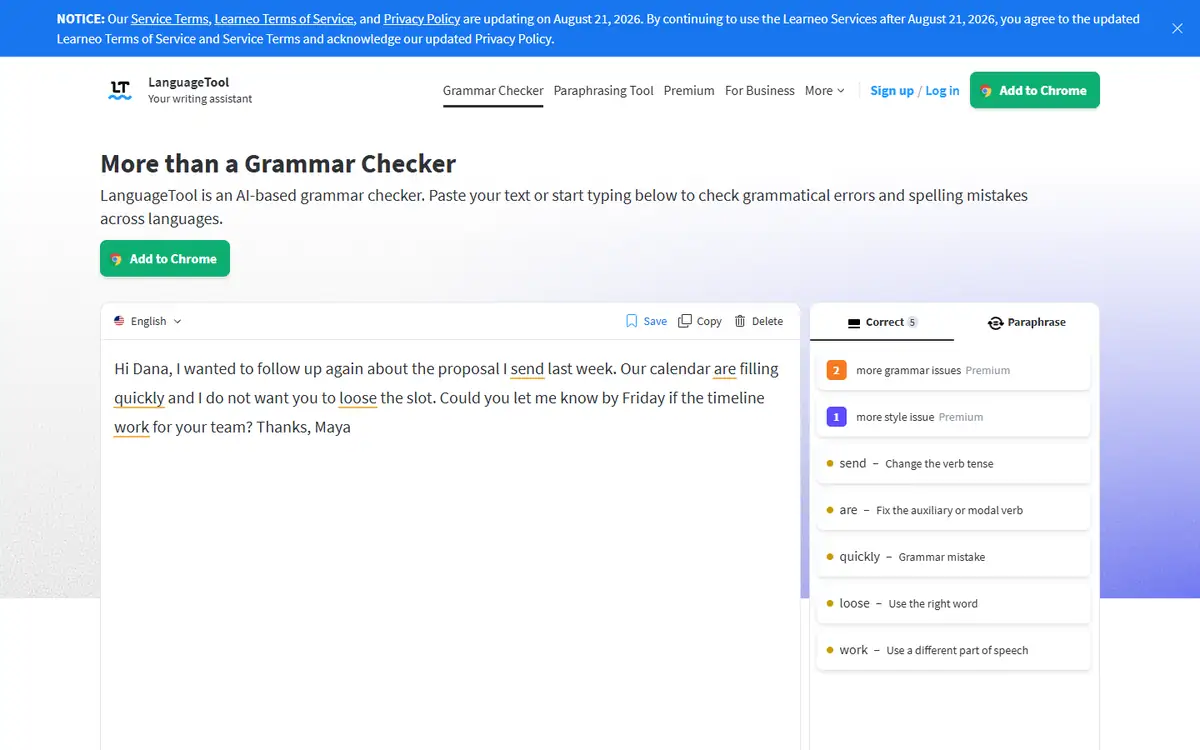
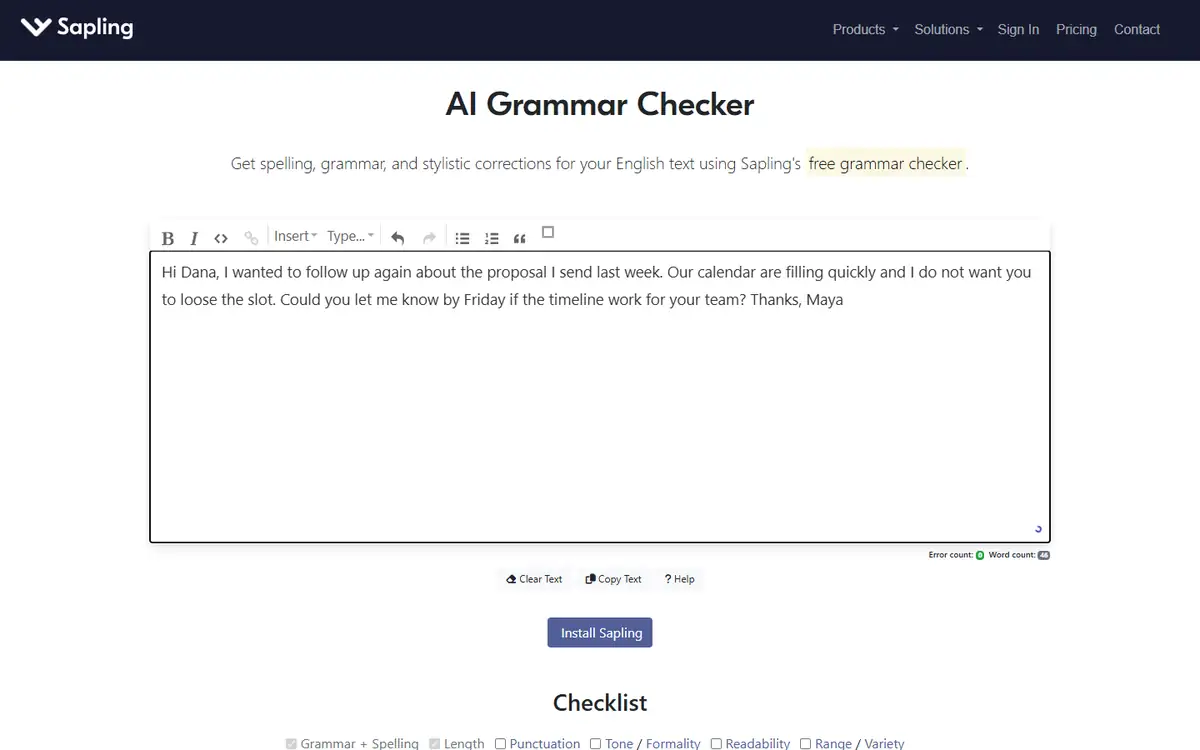
LanguageTool vs Sapling: October test results
| Check | LanguageTool free editor | Sapling free editor | What to do |
|---|---|---|---|
| Visible flags | 4 | 4 | Count alone is not accuracy. |
| “I send … yesterday” | No visible mark | “send” underlined | Change to “sent” after checking intent. |
| “calendar are” | “are attached” marked | “are” underlined | Use “calendar is” or plural “calendars are.” |
| “timeline work” | No visible mark | “work” underlined | Use “works.” |
| “loose the slot” | Marked | “loose” underlined | Use “lose.” |
| Comma after “slot” | Marked | No visible mark | Split into sentences or use a suitable conjunction. |
LanguageTool also marked “teams.” I did not accept that flag automatically because the plural may be correct. Sapling’s four visible red marks matched the four words listed above. Both tools left the final tone decision to the writer.
LanguageTool test: strengths and tradeoffs
The free editor showed four cards with rule descriptions. In this run it called out the agreement around “are attached,” “loose,” the comma splice, and “teams.” The last mark warrants a closer look: the phrase “both teams” is plausible as written.
Where LanguageTool helped
- Exposed rule cards instead of only a numerical counter.
- Marked “loose” and the sentence-boundary problem.
- Worked without signing in for this short sample.
Where manual review remained
- The wrong past tense “send” and “timeline work” were unmarked.
- The “teams” suggestion could change a correct plural.
- Free checks are not the same as Premium or extension behavior.
The vendor says Premium adds more grammar and style checks; this test did not evaluate them.
Sapling test: strengths and tradeoffs
Sapling’s public checker accepted the full 41-word email and displayed Error count: 4. Its red underlines appeared under “send,” “are,” “work,” and “loose.” This directly corrects the older zero-error account on this page.
Where Sapling helped
- Marked the wrong past tense and both agreement/verb problems in this sample.
- Made the four flagged spans visible without an account.
- Showed the word count alongside its error count.
Where manual review remained
- No visible mark appeared on the comma splice.
- The test did not cover its CRM extension or longer documents.
- A flagged span still needs a meaning-preserving edit.
Sapling says the online checker is free and Pro adds suggestions in integrations; this browser run did not evaluate Pro.
LanguageTool vs Sapling quality: what changed the outcome
Grammar tools are easier to test than generative writers because the answer key can be defined in advance.
The difficult part is separating grammar from tone. “Please let me know by Friday” may be appropriate or pushy depending on the relationship.
- Use the exact same input and settings for both tools.
- Score task completion before judging polish.
- Count manual fixes, blocked steps, and failed exports.
- Repeat one edge case instead of trusting a single ideal sample.
Build two checks: a mechanical error pass and a separate human tone pass. Combining them into one score hides useful differences.
LanguageTool vs Sapling pricing and free access
Both free web checkers accepted this 41-word sample without an account on October 25. That covers a short text check, not team deployment or every Premium suggestion.
| Buying check | LanguageTool | Sapling |
|---|---|---|
| Public short-text test | Worked without sign-in | Worked without sign-in |
| Advanced suggestions | Premium adds grammar, punctuation and style checks | Pro adds advanced assistance |
| Team workflow | Check editor, extension and team terms | Check the exact browser or support integration and plan |
Run the same recurring-error paragraph in the specific browser or CRM your team uses. A public demo result does not establish integration behavior.
LanguageTool vs Sapling privacy and data handling
The test material was synthetic or already public. I did not upload client records, private drafts, identity documents, or unreleased media.
For production use, the practical questions are retention, model-training use, deletion controls, subprocessors, and whether a team plan changes those terms.
- Use a disposable sample before sending confidential material.
- Remove names, account numbers, hidden metadata, and tracked changes.
- Confirm whether deleting a project also deletes source files and generated derivatives.
- Record the policy version used for a regulated workflow.
A polished result does not reduce the sensitivity of the source. If the input would be risky in an ordinary support ticket, it is risky in an AI tool too.
Recheck the official LanguageTool page and the official Sapling page before uploading confidential material or paying. Product limits and policy language can change after this test date.
Who should use LanguageTool or Sapling?
LanguageTool is worth testing when
- You value inspectable rule cards and punctuation prompts.
- You need a free-web check before comparing its paid editor or extension.
Sapling is worth testing when
- Your support drafts often contain tense and agreement errors like this sample.
- You will verify whether the same behavior appears in your actual integration.
When neither can approve a message alone
- The email makes a contractual, security or deadline promise.
- The Friday request could read as pressure in context.
- The text cannot be sent to a third-party checker.
Use a human final read for meaning and tone.
LanguageTool vs Sapling: final buying decision
For this specific short email, Sapling surfaced more of the planted verb errors. LanguageTool supplied explicit rule cards and caught the punctuation issue that Sapling left alone. The single sample is too narrow to declare one universally better.
- Try a paragraph containing your team’s recurrent mistakes in both free editors.
- Separate mechanical accuracy from tone and customer-policy review.
- Check the exact extension, dialect, plan, and privacy terms before rolling either into a support workflow.
Correct “send,” “are,” “work,” and “loose,” split the comma splice, then read the full message aloud before it reaches a customer.
For more comparisons, visit the AI tool comparisons hub.
LanguageTool vs Sapling FAQ
Is Sapling better than LanguageTool for grammar?
In the October 25 public-web test, both showed four flags. Sapling marked more of this sample’s verb errors; LanguageTool flagged the punctuation issue. A longer, varied test is needed for a broader verdict.
Did either checker catch every issue?
No. LanguageTool left “send” and “work” unmarked; Sapling left the comma splice unmarked. Tone still needs human judgment.
Why did the earlier page say Sapling found zero errors?
That was a July 2026 browser observation. The October retest produced four visible flags on a new 41-word sample, so the older count no longer describes the current free web editor.
Next step
Paste your team’s real recurring-error paragraph into both checkers and score corrections against an answer key before installing an extension.