
Hands-on comparison
LanguageTool vs Sapling: Grammar Test
I planted six grammar and tone problems in a client follow-up email, then compared detections, false reassurance, and the amount of manual editing left.
LanguageTool vs Sapling: the tested verdict
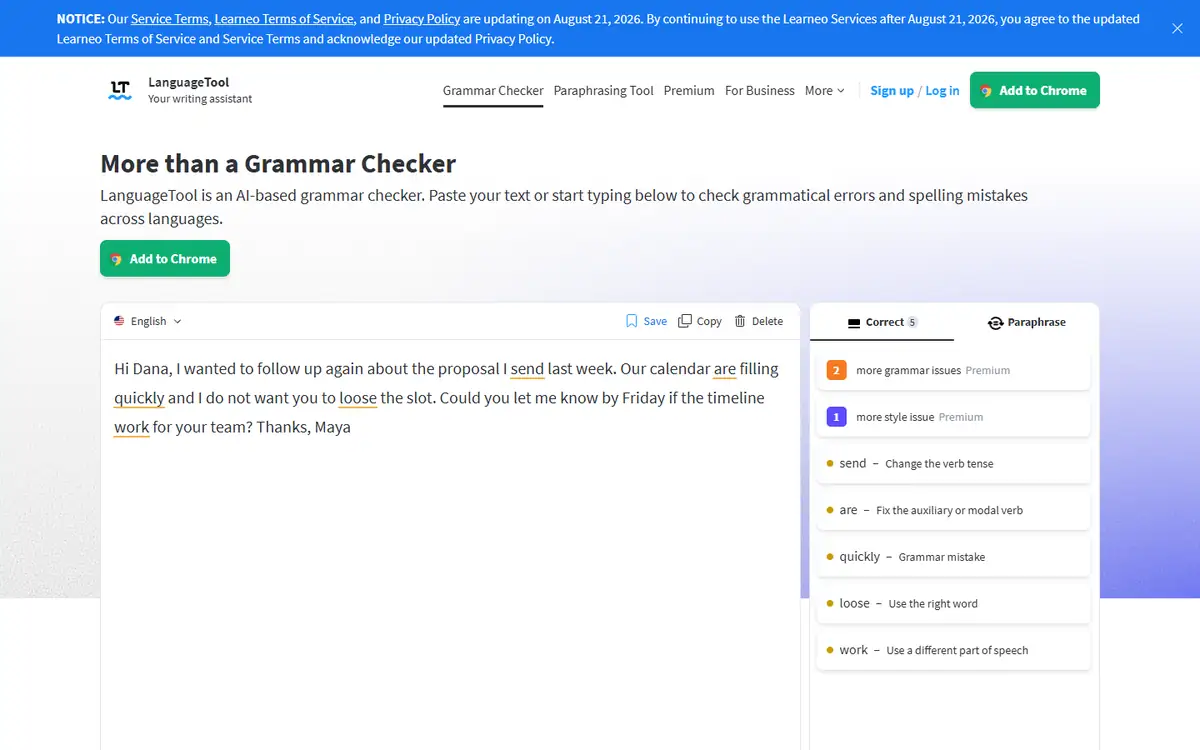
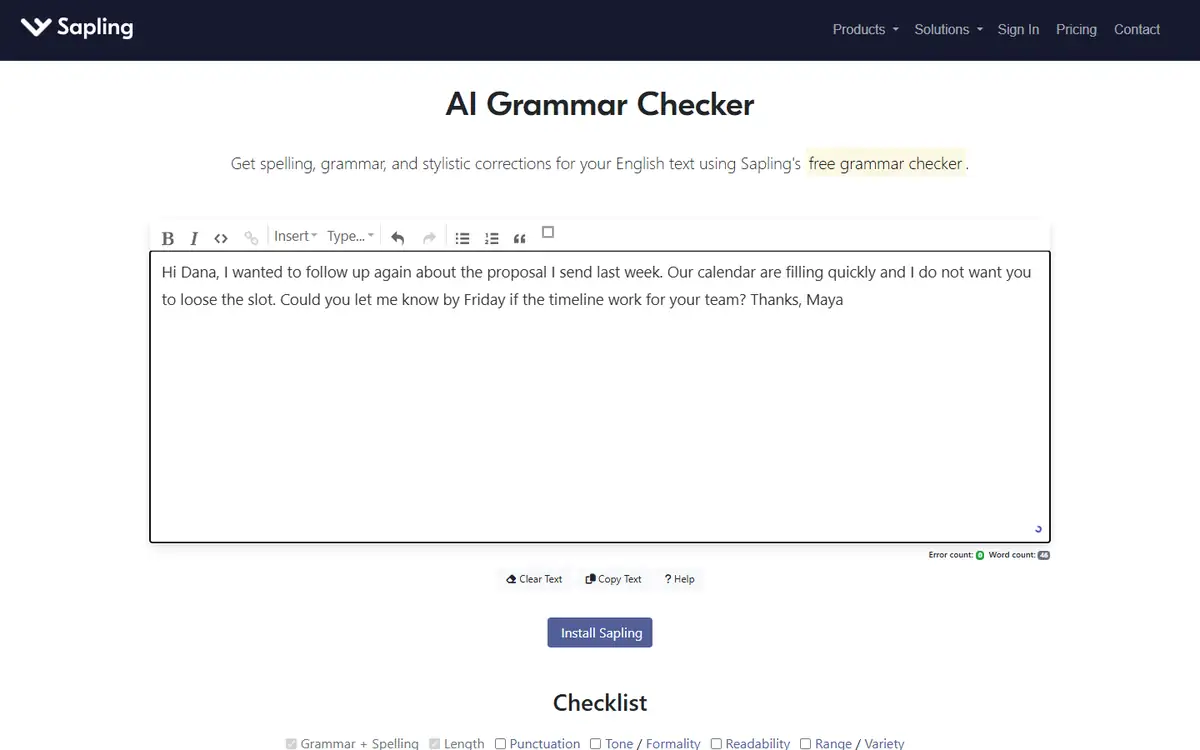
The email included “proposal I send,” “calendar are,” “loose the slot,” and “timeline work.” LanguageTool flagged three issues, while Sapling’s page reported zero.
LanguageTool did not earn a perfect score. It missed the incorrect past tense and one subject-verb agreement issue, so the winner still required manual review.
It found agreement, punctuation, and the lose/loose error; it still missed important tense issues.
LanguageTool is the safer first checker for this business-email task, but neither tool is a substitute for reading the message aloud.
How I tested LanguageTool vs Sapling
I ran this comparison on July 28, 2026 in a clean, logged-out Chrome session at 1440 by 1050 pixels. Both tools received the same input, and I timed the usable result rather than the first animation or loading state.
I wrote a short follow-up that contained agreement, tense, word-choice, punctuation, and tone risks without using nonsense text.
- Paste the exact same 46-word email into both public checkers.
- Record the visible issue count and proposed replacements.
- Compare each flag against a six-item answer key.
- Count misses separately from false positives.
The answer key included send/sent, calendar/calendars are, loose/lose, timeline work/works, a compound-sentence comma, and the pressure created by the request.
LanguageTool vs Sapling test results
| Test area | LanguageTool | Sapling | Decision impact |
|---|---|---|---|
| Subject-verb agreement | Caught one case | Missed | LanguageTool gave useful but incomplete coverage. |
| Loose vs lose | Caught | Missed | A customer-facing typo remained in Sapling. |
| Past tense send vs sent | Missed | Missed | Both required human review. |
| Visible issue count | 3 | 0 | Sapling created false confidence in this run. |
LanguageTool suggested “is” for one agreement problem, a comma before a coordinated clause, and “lose” for “loose.” Those were valid changes.
Sapling’s zero count was more damaging than an imperfect suggestion because it told the writer the email was clean. The text was not clean.
LanguageTool test: strengths and tradeoffs
LanguageTool exposed individual rule messages and replacement candidates. That made it possible to audit why each edit appeared.
It still left two basic grammar errors untouched. The tool worked as a filter, not a final editor.
Where LanguageTool did well
- Caught the most damaging typo
- Transparent rule messages
- Useful public API response for repeatable tests
Where LanguageTool fell short
- Only half of the planted issues were flagged
- Tone pressure was not resolved
- Browser and extension plans may differ
LanguageTool earned the win because it reduced error count without inventing corrections.
Sapling test: strengths and tradeoffs
Sapling accepted the full email and displayed its writing checklist, but the central error counter stayed at zero.
That result may reflect the public demo rather than every integration. It is still the experience a buyer sees before installing anything.
Where Sapling did well
- Clean interface
- Fast paste workflow
- Additional tone and readability categories are visible
Where Sapling fell short
- Zero errors on a deliberately flawed email
- No useful correction trail in the test
- Public result did not justify trust
I would retest Sapling inside the exact CRM or help-desk integration before relying on it.
LanguageTool vs Sapling quality: what changed the outcome
Grammar tools are easier to test than generative writers because the answer key can be defined in advance.
The difficult part is separating grammar from tone. “Please let me know by Friday” may be appropriate or pushy depending on the relationship.
- Use the exact same input and settings for both tools.
- Score task completion before judging polish.
- Count manual fixes, blocked steps, and failed exports.
- Repeat one edge case instead of trusting a single ideal sample.
Build two checks: a mechanical error pass and a separate human tone pass. Combining them into one score hides useful differences.
LanguageTool vs Sapling pricing and free access
I checked the public entry points and pricing language during the test. I did not treat a prominent free label as proof that the complete workflow was free.
The useful unit is a finished task: an export, an answer set, or a file that can be used outside the editor. A free preview that stops before that point has limited buying value.
| Buying question | LanguageTool | Sapling |
|---|---|---|
| Can the test start without an account? | See tested result | See tested result |
| Can a usable result be exported? | Verify at the final step | Verify at the final step |
| Are limits based on files, words, or credits? | Check live plan | Check live plan |
| Does the plan renew automatically? | Check checkout | Check checkout |
I would run one representative job before subscribing, then divide the monthly price by the number of outputs that actually pass review. That number is more honest than a per-credit headline.
LanguageTool vs Sapling privacy and data handling
The test material was synthetic or already public. I did not upload client records, private drafts, identity documents, or unreleased media.
For production use, the practical questions are retention, model-training use, deletion controls, subprocessors, and whether a team plan changes those terms.
- Use a disposable sample before sending confidential material.
- Remove names, account numbers, hidden metadata, and tracked changes.
- Confirm whether deleting a project also deletes source files and generated derivatives.
- Record the policy version used for a regulated workflow.
A polished result does not reduce the sensitivity of the source. If the input would be risky in an ordinary support ticket, it is risky in an AI tool too.
Recheck the official LanguageTool page and the official Sapling page before uploading confidential material or paying. Product limits and policy language can change after this test date.
Who should use LanguageTool or Sapling?
LanguageTool is best for
- Writers who want explainable grammar flags
- Multilingual teams checking short business copy
- Developers who can use a public checking API
Sapling is best for
- Support teams already evaluating Sapling integrations
- Users who want a lightweight checklist
- Teams willing to verify public-demo behavior in their own stack
Who should use neither tool
- Teams that need a signed data-processing agreement before any test.
- Users who cannot independently verify the output.
- Workflows where a missed fact, altered edge, or false label creates legal or safety risk.
Neither tool should auto-accept edits in sensitive client communication.
LanguageTool vs Sapling: final buying decision
LanguageTool wins by a wide margin in this seeded-error test.
The modest three-of-six catch rate is a reminder that the right comparison is not “AI versus no AI.” It is tool plus editor versus unreviewed output.
- Choose the tool that completes your real task with fewer corrections.
- Treat sign-in walls, CAPTCHAs, and export limits as part of the product.
- Keep a manual verification step for high-impact work.
- Retest after a major model, editor, or pricing update.
Use LanguageTool as the first pass, fix the known misses manually, and keep Sapling in a trial until it passes your own regression paragraph.
For more hands-on comparisons, visit the AI tool comparisons hub.
LanguageTool vs Sapling FAQ
Is LanguageTool better than Sapling?
For this July 2026 email test, yes. LanguageTool caught three planted issues while Sapling displayed zero.
Did LanguageTool catch every error?
No. It missed the incorrect past tense and another agreement problem.
Why test grammar tools with known errors?
A seeded answer key shows both misses and false positives instead of rewarding a polished interface.
Next step
Paste your team’s real recurring-error paragraph into both checkers and score corrections against an answer key before installing an extension.